
Computer Invoice Template for IT Services and Repairs
A computer invoice template is a bill for IT work such as diagnostics, hardware repairs, parts, software installation, data recovery, network setup or a monthly support plan. It lists each service with its hours or fixed price, each part with its model and serial number where relevant, any licences or subscriptions resold, and the total due, together with your business and the customer's details, an invoice number, a ticket or job reference and payment terms. Open it online with typical IT lines filled in, or download it for Excel, Word or as a blank PDF.
Free, no account. Opens the invoice generator with these lines filled in.
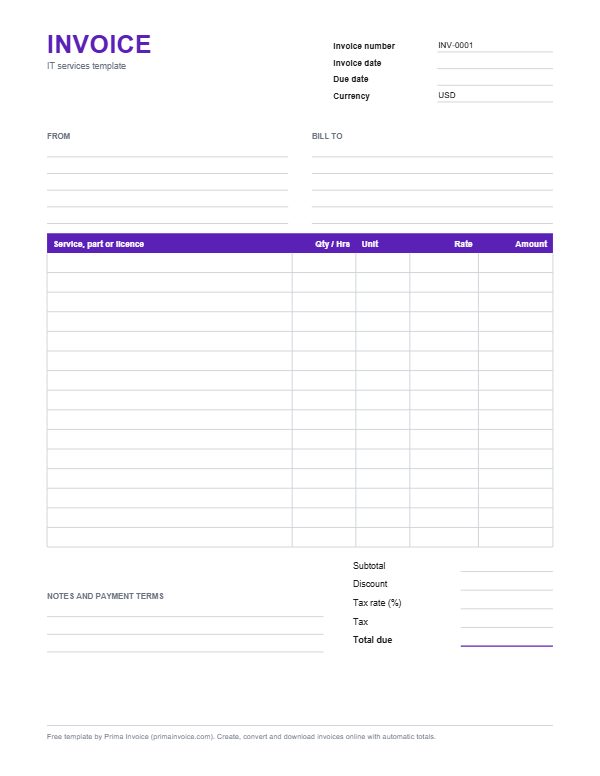
Example IT services invoice
These are typical lines for this kind of work. Edit, delete or add lines once the template is open.
| Service, part or licence | Qty / Hrs | Unit | Rate | Amount |
|---|---|---|---|---|
| Diagnostic: laptop not booting | 1 deviceat $65.00 | device | $65.00 | $65.00 |
| SSD 1 TB NVMe, replacement drive | 1 partat $89.00 | part | $89.00 | $89.00 |
| Data recovery and transfer to new drive | 1.5 hourat $90.00 | hour | $90.00 | $135.00 |
| Operating system reinstall and updates | 1 deviceat $75.00 | device | $75.00 | $75.00 |
| Router and Wi-Fi mesh setup, small office | 2 hourat $90.00 | hour | $90.00 | $180.00 |
| Managed support plan, per device | 8 device/monthat $35.00 | device/month | $35.00 | $280.00 |
| Cloud backup subscription, per user | 5 user/monthat $6.00 | user/month | $6.00 | $30.00 |
| On-site call-out within metro area | 1 visitat $45.00 | visit | $45.00 | $45.00 |
| Subtotal before tax | $899.00 | |||
Typical columns on an IT services invoice
| Column | What to put in it |
|---|---|
| Service, part or licence | "Diagnostic, laptop not booting", "SSD 1 TB, NVMe", "Office suite licence, 12 months". Include model numbers for parts. |
| Quantity or hours | Labour hours (in quarter or half hours if that is how you bill), number of parts, seats or devices. |
| Unit | hour, device, seat, user, month, part. Managed services clients especially need per-device or per-user units. |
| Rate | Hourly rate, part price or the monthly price per device or user from your agreement. |
| Amount | Quantity multiplied by rate, added up automatically in the generator and the spreadsheet. |
| Ticket and device reference | Ticket number, device name or serial, and the user affected. It links the bill to your helpdesk history. |
Break-fix repairs versus managed services
IT businesses bill in two broad ways. Break-fix work is charged when something goes wrong: a diagnostic fee, labour by the hour, parts at their price. Managed services are charged as a recurring fee per device, per user or per site, covering monitoring, patching, backups, antivirus and a helpdesk allowance, with extra work billed on top.
Many technicians do both. The invoice should make clear which lines are covered by the plan and which are extra. The sample shows a typical mixed month for a small office: a repair with parts and data recovery, a network job, the monthly plan for eight devices and backup seats for five users.
Diagnostics, labour increments and minimums
Diagnostics are often a fixed fee, sometimes credited if the customer goes ahead with the repair. If you credit it, show the diagnostic fee and a matching discount so the customer sees the saving.
State your billing increment, such as 15 or 30 minutes, and any minimum charge per visit or remote session. Remote support is frequently billed in smaller increments than on-site work. Writing "Remote session, 0.75 hours" with the ticket number is far more convincing than a round number with no detail.
Parts, warranties and serial numbers
List each part with brand, model and capacity, and record serial numbers either on the invoice or in your job notes. Customers need them for warranty claims, and you need them to trace returns. Say whether parts come with the manufacturer's warranty and whether you offer your own workmanship guarantee on the repair.
If the customer supplied their own part, note it. It explains a lighter invoice and protects you if the part turns out to be faulty.
Software licences and subscriptions
Technicians often resell or manage licences for office suites, security tools, backup and password managers. Show each licence with its term and the number of seats or users, such as "Endpoint security, 12 months, 10 seats". If you bill subscriptions monthly while paying the vendor annually, make the commitment clear in your agreement so a client who cancels mid-term understands what remains payable.
Avoid naming vendor brands in a way that suggests you are the vendor. Describe the product category and your service around it.
Data recovery and privacy
Data recovery is priced differently from routine repair because outcomes are uncertain. Many technicians charge an evaluation fee and then a recovery fee only if data is retrieved, with clear wording such as "No data, no recovery fee". Specialist lab work for physically damaged drives is usually quoted separately.
Customers trust you with their files. Your invoice should never list file names, passwords or personal content. Describe the work, not the data: "Recovered user documents and photos, approximately 180 GB".
Network, cloud and project work
Projects such as office moves, network rewiring, server migrations, Wi-Fi surveys or cloud email migrations are best quoted up front and invoiced by milestone: survey and design, installation, cutover, documentation. Hardware ordered for a project can be invoiced on order with a deposit, because switches, firewalls and access points are expensive to carry on your own account.
Handover documentation, including network diagrams, admin credentials stored in the client's password vault and a list of installed equipment, is part of a professional deliverable and worth listing as a line.
A worked example from the sample lines
The sample adds up as follows: a $65 diagnostic, an $89 replacement drive, 1.5 hours of data recovery at $90 ($135), a $75 operating system reinstall, 2 hours of router and mesh setup at $90 ($180), a managed plan for 8 devices at $35 ($280), cloud backup for 5 users at $6 ($30) and a $45 on-site call-out. The subtotal before tax is $899.
These prices are examples to show the structure. IT rates depend on location, specialism and whether you serve homes or businesses.
Business clients and recurring billing
Small business clients want predictable monthly bills. Invoice managed plans on the same day each month, list device and user counts so changes are visible, and put extra work on separate lines with ticket numbers. A Prima Invoice account can create the monthly plan invoice automatically, as a draft for you to check or sent on schedule, and remind clients before it falls due.
When device counts change mid-month, decide in your agreement whether you prorate or bill from the next cycle, and keep to it.
Collecting payment before releasing equipment
Repair shops commonly release devices on payment. Generate the invoice when the job is ready, send it with a card payment link from your own Stripe or PayPal account, and the customer can pay before arriving to collect. Prima Invoice never handles the money; it goes directly to you. Then hand over a receipt made from the same invoice data.
After-hours, emergencies and service levels
An agreement with response targets, such as a four-hour reaction for critical outages, normally defines business hours and premium multipliers for evenings, weekends and public holidays. When you are paged at midnight because a firewall died or ransomware locked the file server, bill that emergency intervention on its own line with the timestamp, the severity and the rate tier applied. Clients accept premium charges more readily when the invoice shows the incident was outside the window their plan covers.
Security incident response deserves particular care: containment, forensic imaging, credential resets, restoring from snapshots and post-incident reporting are distinct activities. Itemise them so insurers, who may reimburse part of the cost under a cyber policy, can see exactly what was performed.
Staff onboarding, offboarding and peripherals
Growing companies repeatedly ask for the same routine: provision a laptop, enrol it in device management, create mailbox and accounts, configure multi-factor authentication, install line-of-business apps, then do the reverse when someone leaves. Price these as fixed packages per starter and per leaver, which keeps quoting fast and invoices predictable.
Printers, scanners, docking stations, monitors, headsets, webcams, label printers, point-of-sale terminals and smartphones generate a steady trickle of small jobs. Group them sensibly by ticket so a busy month does not produce a forty-line bill nobody wants to read.
Hardware procurement, hosting and renewals
Buying equipment on a client's behalf involves margin, freight, and sometimes leasing or financing. Show hardware at your selling price with quantity, and keep the distributor invoices for warranty registration. Domain registrations, SSL certificates, web hosting, email filtering and offsite backup storage renew yearly or monthly; listing renewal dates in the description helps clients anticipate the next charge and avoids surprise outages from lapsed services.
Retired machines should be wiped or physically destroyed before disposal. If you provide certified data erasure or drive shredding and arrange electronics recycling, invoice it as a separate service and attach the destruction certificate, which many regulated businesses must keep.
Home users, students and gamers
Residential customers bring different requests: virus removal, slow laptops, upgrading memory, building custom gaming rigs, setting up smart TVs and home printers, recovering a forgotten account, or teaching an elderly parent to video call grandchildren. Keep descriptions jargon-free for them. A flat-price menu for common fixes, pickup and drop-off fees, and a clearly stated hourly rate for tuition sessions make the paperwork friendly while still itemised. Many shops also offer discounted rates for pensioners or students; if you do, show the discount explicitly so the standard price remains visible.
Tips for your IT services invoice
Quote ticket numbers
Every line with a ticket or job number links back to your helpdesk notes, which settles most questions instantly.
State your time increment
Say you bill in 15 or 30 minute steps and show times to that precision. Odd decimals without explanation invite doubt.
Separate plan and extra work
Clients on a support plan need to see at a glance what the plan covered and what is chargeable on top.
Record part serial numbers
Serials on the invoice or job sheet make warranty claims and returns painless for you and the customer.
Never put credentials on invoices
Passwords, recovery keys and file names do not belong on a document that is emailed and filed.
Bundle routine onboarding
A fixed per-starter package for laptop setup, accounts and security turns a dozen tiny lines into one clear charge.
Frequently asked questions
How should a computer repair shop invoice a customer?
List the diagnostic, each repair task with its time or fixed price, each part with its model, any data recovery or setup work, and the total. Add the ticket number and device details in the notes and hand over a receipt when the customer pays.
How do I invoice a monthly managed IT plan?
Bill the plan as a recurring line priced per device or per user for the month, and add any extra work outside the plan as separate lines with ticket numbers.
Should the diagnostic fee be credited against the repair?
That is a business choice. If you credit it, show the diagnostic fee and a matching discount so the customer can see the saving.
What billing increment do IT technicians use?
Common increments are 15 or 30 minutes, often with a minimum per visit or remote session. State yours in your terms and invoice in the same steps.
Can I bill software licences on an IT invoice?
Yes. List each licence with its term and number of seats or users, and make any annual commitment clear in your agreement.
How do I invoice data recovery that might fail?
Many technicians charge an evaluation fee up front and a recovery fee only if data is successfully recovered. State the rule in your quote and on the invoice.
How do I bill after-hours IT emergencies?
Put the emergency work on its own line with the date, time and the premium rate your agreement defines for evenings, weekends or holidays, plus the ticket number and a short description of the incident.
Should secure data wiping be a separate charge?
Usually yes. Certified erasure or drive destruction is a distinct service; list it per device and attach any destruction certificate the client needs for their records.
Sources
Sources checked 2026-10-26. Rules differ by country, so check with your local tax office or an adviser.
Related templates
Consulting Invoice Template
Retainer, day-rate and project invoice for consultants and advisers, with workshop, report and reimbursable expense lines.
Freelance Invoice Template
Hourly and project-based invoice for freelancers, with typical lines such as discovery calls, drafts, revisions and rush fees.
Invoice Template for Excel
An .xlsx workbook with live formulas for line totals, subtotal, discount, tax and total. No macros.
Fill it in online, download a PDF
The invoice generator opens with this template's lines. Add your prices, tax and logo, then download.