
Printable PDF Invoice Template
This PDF invoice template is a free blank invoice form you can print and fill in by hand, or type into on screen in most PDF readers. It has boxes for your details and the client's, the invoice number, dates and currency, a fifteen-row item table with description, quantity, unit, price and amount columns, and lines for subtotal, discount, tax and total. If you want a finished, professional PDF with the arithmetic done for you, fill in the online generator and download the PDF instead.
Free, no account. Opens the invoice generator with these lines filled in.
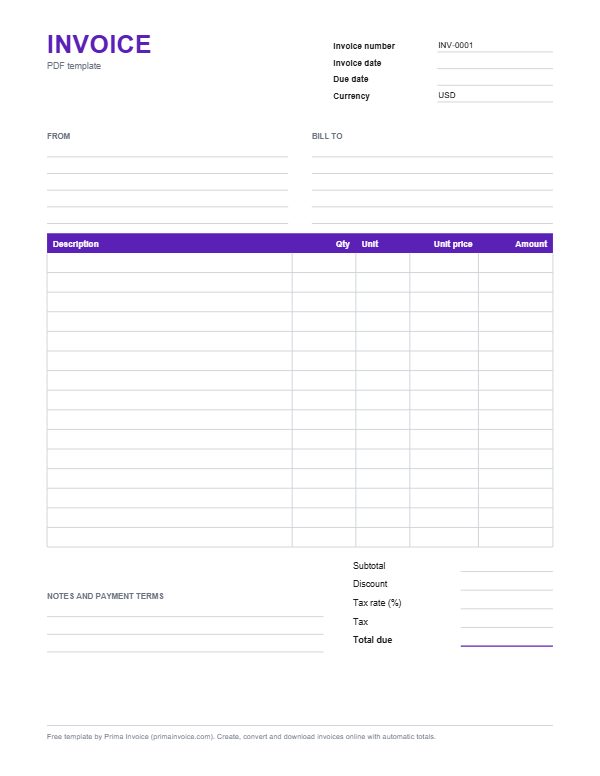
Example PDF invoice
These are typical lines for this kind of work. Edit, delete or add lines once the template is open.
| Description | Qty | Unit | Unit price | Amount |
|---|---|---|---|---|
| Bicycle service, full tune-up | 1 serviceat $85.00 | service | $85.00 | $85.00 |
| Brake pads, pair | 2 pairat $18.00 | pair | $18.00 | $36.00 |
| Inner tube, 700c | 2 pieceat $9.00 | piece | $9.00 | $18.00 |
| Chain replacement, labour | 0.5 hourat $50.00 | hour | $50.00 | $25.00 |
| Chain, 11-speed | 1 pieceat $39.00 | piece | $39.00 | $39.00 |
| Wheel truing | 2 wheelat $20.00 | wheel | $20.00 | $40.00 |
| Subtotal before tax | $243.00 | |||
Typical columns on a PDF invoice
| Column | What to put in it |
|---|---|
| Description | The widest column, for what you sold or did. Write in block capitals if you are filling it in by hand. |
| Qty | Hours, items or days. Use decimals for part hours, such as 1.5. |
| Unit | A short word: hr, pc, day, km. Saves space in a handwritten table. |
| Unit price | Price per unit before tax. |
| Amount | Quantity times unit price. Work it out before writing; corrections on paper look messy. |
| Totals lines | Subtotal, discount, tax rate, tax and total due, at the bottom right. |
Two ways to get a PDF invoice
People searching for a PDF invoice template usually want one of two things. Some want a blank form to print and complete with a pen: market traders, mobile mechanics, tutors who bill parents in person, or anyone who prefers paper. Others want a neat, typed PDF to email a client. This page offers both.
The blank PDF download is a single page form. Print as many copies as you like, or open it in a PDF reader that supports form fields and type into the boxes. The online generator, on the other hand, produces a finished PDF from what you type: totals calculated, your logo at the top, any currency, an optional payment link, and selectable text that accounting software and screen readers can read.
Filling in the blank form by hand
Before using a printed form, write the invoice number in the box at the top. Keep a running list of numbers so each form gets the next one in sequence; duplicates cause confusion for you and the client. Fill in your details once on a master copy and photocopy it, so you only handwrite the client and the items each time.
Use a dark pen and block capitals. Calculate each amount and the subtotal on a calculator before writing them in, and write the total clearly, perhaps with a box around it. Keep a copy for yourself: photograph the completed form with your phone, or use a carbon or duplicate sheet if you work from a pad.
Typing into the PDF on screen
The download includes form fields, so in many PDF readers you can click a box and type. Desktop readers, the built-in viewers in most modern browsers and many phone apps support fields; a few basic viewers only display the page. If typing does not work in yours, open the file in a different reader or use the online generator, which is designed for typing.
Remember that a PDF form does not calculate: you still work out the amounts. When you finish, use Print to PDF or Save As to keep a copy with your entries, because some viewers discard typed text when the file closes.
Why businesses send invoices as PDFs
PDF is an open international standard, published as ISO 32000, which is one reason a PDF looks the same on every computer, phone and printer. Fonts and layout are embedded, the file opens without the program that created it, and casual edits are difficult. That is exactly what you want from a document that asks for money.
Some tax authorities explicitly accept invoices sent as PDFs. The Australian Taxation Office, for example, notes that you can issue a tax invoice to a customer by emailing an invoice in PDF or other digital formats. Rules differ by country, and structured e-invoicing systems are a separate topic, so check what applies to you.
Scanning and archiving paper invoices
If you issue paper invoices, keep digital copies too. A phone scanning app produces a cropped, readable PDF in seconds. Name each scan by invoice number and date, store them in a folder per year, and back them up. When a client asks for a copy months later, or your accountant needs records at tax time, you will find it in moments instead of searching through a box of receipts.
From blank form to generated PDF
Hand-filled forms are quick in the field but time-consuming to chase and reconcile. When you find yourself writing the same client and the same items again and again, the online generator saves real time: it remembers your draft in the browser, converts quotes into invoices and invoices into receipts, and supports any ISO 4217 currency with the right number of decimals.
Generated PDFs from the free generator carry a small Made with Prima Invoice link. A Prima Invoice account removes it and adds saved clients, numbering and reminders.
A worked example with the sample lines
The example lines on this page show a bike workshop bill: an $85 tune-up, two pairs of brake pads at $18 ($36), two inner tubes at $9 ($18), half an hour of chain labour at $50 ($25), a $39 chain and two wheels trued at $20 ($40). The subtotal is $243 before any tax. On the paper form you would write those figures by hand; click Use this template and the generator fills them in and adds them up.
The prices are examples, not a price list.
Printing tips for clean results
Print at actual size (100%) rather than fit to page if your printer allows, so the boxes keep their proportions. The form is US Letter; on A4 paper choose fit to page, and it will print with slightly wider margins. Grey lines are designed to print lightly so handwriting stands out. If your printer is low on ink, the faint lines may disappear, so check one copy before printing a stack.
A PDF is not a structured e-invoice
Governments increasingly talk about e-invoicing, and the term causes confusion. The European Commission defines eInvoicing as the structured electronic exchange of invoice data between a supplier and a buyer, enabling full automation of processing without manual input. A PDF, however neatly laid out, is a picture of an invoice for humans to read; it is not machine-readable structured data in that sense.
For most small businesses selling to other small businesses or consumers, an emailed PDF remains normal practice. If you supply public administrations, or work in a country that mandates structured formats for certain transactions, you may need dedicated e-invoicing software or a network provider in addition to, or instead of, a PDF. Prima Invoice creates PDFs and does not claim compliance with structured e-invoicing standards.
Every box on the form, explained
Top right: invoice number, invoice date, due date and currency code. Below: From, for your trading name, street, town, postcode, country, phone, email and any registration or tax number; and Bill to, for the customer's equivalent. The ruled table holds up to fifteen rows. Beneath it sit subtotal, discount, tax rate as a percentage, tax amount and total due, the last underlined in violet so it stands out. Bottom left are lines for notes and payment terms, where you can write bank details, accepted methods or a thank-you message.
Anything not relevant can stay blank. A cash sale at a craft fair may need only the items, total and date, while a business customer will expect full addresses and a due date.
Market stalls, mobile trades and event vendors
Paper still shines where laptops are impractical: farmers' markets, festival food trucks, roadside repairs, piano tuning, dog grooming vans, wedding florists setting up at venues. A clipboard with pre-numbered forms, a calculator and a phone camera for copies covers most needs. If a customer wants to pay by card later, write a short payment link or your bank details in the payment terms box; with the online generator you can include a clickable link from your own Stripe or PayPal account instead.
Corrections, cancellations and voided forms
Mistakes on paper should stay visible rather than vanish. Strike through the wrong figure with a single line, write the correct one beside it and add your initials; avoid correction fluid, which invites suspicion. If a form is badly spoiled, write VOID across it diagonally and file it anyway, so the gap in your numbering is explained when an auditor or accountant flips through the sequence.
Once a customer has their copy, do not issue a second form with the same number. Instead, write a fresh invoice with a new number referencing the original, or issue a credit note that cancels it.
Getting handwritten sales into your books
Each week, enter the paper invoices into a spreadsheet or bookkeeping app: number, date, customer, net amount, tax, total and whether it is paid. Doing it weekly takes minutes; doing it once a year takes a weekend and produces errors. Many people photograph forms on the spot and type them up on Friday afternoons. Highlight unpaid ones and follow up politely by phone or text, because handwritten bills are easy for customers to misplace in a glovebox or kitchen drawer.
Sharing a scanned invoice by message
Customers who booked through a chat app often want the bill the same way. Export or scan the completed form as a PDF rather than sending a blurry photo; PDFs keep their sharpness when zoomed, attach cleanly to email, and print properly if the customer's bookkeeper needs paper. Keep file sizes modest, ideally under a megabyte, by scanning in greyscale at moderate resolution. Include the invoice number and amount in the message text too, so it is searchable later even if attachments are archived or expire.
Tips for your PDF invoice
Pre-number your printed forms
Write numbers on a stack of blank forms before you go out. You will never issue the same number twice in a rush.
Photocopy a master with your details
Fill in your business details once, then copy that master so each invoice only needs the client and items.
Photograph every completed form
A quick phone photo is your copy. Without it, a lost paper invoice is a lost record.
Save typed forms before closing
Some PDF viewers drop typed entries on close. Save or print to PDF to keep what you entered.
Box the total
Draw a box around the total due on handwritten invoices. It is the number the client looks for first.
Never use correction fluid
Strike through mistakes with one line and initial them. Visible corrections are trusted; hidden ones raise questions.
Keep spare forms waterproof
A plastic sleeve or zipped folder protects blank forms from rain, coffee and engine oil in vans, stalls and workshops.
Print a test page first
Faint grey rules can vanish on low toner. Check one sheet before printing a stack for the season.
Frequently asked questions
Is the PDF invoice template fillable?
Yes. It has form fields that you can type into in many PDF readers and browsers. It does not calculate totals, so work out amounts first, or use the online generator for automatic maths.
Can I print the PDF invoice on A4 paper?
Yes. The form is US Letter; choose fit to page in your print dialog and it prints on A4 with slightly wider margins.
Why is my typed text missing when I reopen the PDF?
Some viewers do not save form entries. Use Save As or Print to PDF after typing, or open the file in a reader that saves form data.
How do I make a PDF invoice with my logo?
Use the online generator: upload your logo, fill in the invoice and download the PDF. The blank form is for handwriting or quick typing without a logo.
Are PDF invoices legally valid?
In many countries PDF invoices are accepted. For example, the Australian Taxation Office says a tax invoice can be emailed as a PDF. Some countries require structured e-invoices for certain transactions, so check local rules.
Can I edit a PDF invoice after sending it?
You should not change an invoice once it has been sent. If something is wrong, issue a corrected invoice or a credit note and keep both in your records.
Is a PDF invoice the same as an e-invoice?
Not in the regulatory sense. The European Commission describes e-invoicing as the exchange of structured, machine-processable invoice data. A PDF is a readable document; some countries and public buyers require structured formats instead.
How should I correct a mistake on a handwritten invoice?
Strike through the error with a single line, write the correct figure next to it and initial it. If the form is spoiled, mark it VOID, keep it in your records and use the next numbered form.
Sources
- ISO 32000-2:2020, PDF 2.0
- Australian Taxation Office: Tax invoices
- ISO 4217 currency codes
- European Commission: eInvoicing
Sources checked 2026-10-25. Rules differ by country, so check with your local tax office or an adviser.
Related templates
Invoice Template for Word
An editable .docx invoice with item table, totals block and payment terms, ready for your logo and prices.
Invoice Template for Excel
An .xlsx workbook with live formulas for line totals, subtotal, discount, tax and total. No macros.
Free Receipt Template
Proof-of-payment template with payment date, method, items, amount paid and balance, in Word, Excel and PDF.
Fill it in online, download a PDF
The invoice generator opens with this template's lines. Add your prices, tax and logo, then download.