
Free Quote Template
A quote template, also called a quotation template, is a ready-made document for offering a fixed price before work starts. It lists your business and the customer, a quote number and date, a valid-until date, each item or task with its quantity and price, the total, and the terms the price depends on, such as scope, exclusions, deposit and how to accept. Download it free for Excel, Word or as a blank PDF, or open it in the quote maker and turn the accepted quote into an invoice without retyping.
Free, no account. Opens the quote maker with these lines filled in.
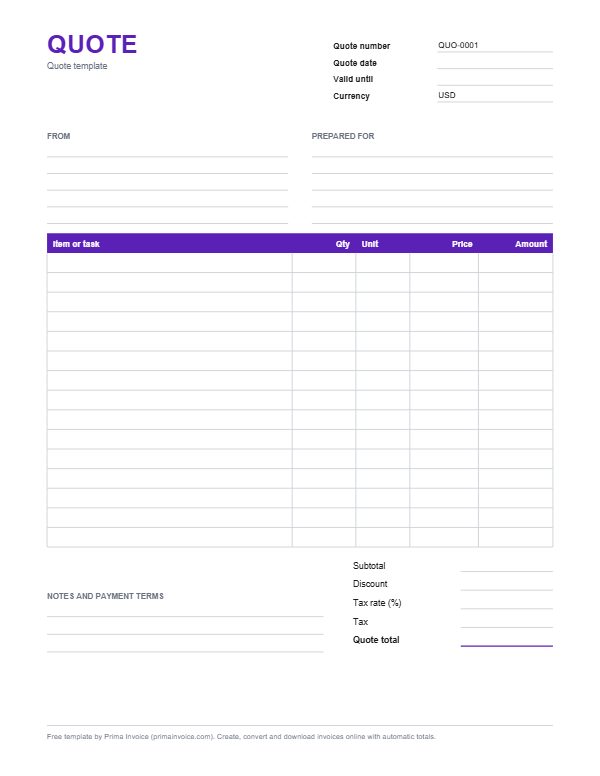
Example quote
These are typical lines for this kind of work. Edit, delete or add lines once the template is open.
| Item or task | Qty | Unit | Price | Amount |
|---|---|---|---|---|
| Kitchen cabinet painting, 24 doors and frames | 1 jobat $2,800.00 | job | $2,800.00 | $2,800.00 |
| Degrease, sand and prime surfaces | 12 hourat $55.00 | hour | $55.00 | $660.00 |
| Premium enamel paint, satin finish | 3 gallonat $79.00 | gallon | $79.00 | $237.00 |
| New brushed steel handles, supplied and fitted | 24 pieceat $8.50 | piece | $8.50 | $204.00 |
| Protection, masking and daily cleanup | 1 jobat $180.00 | job | $180.00 | $180.00 |
| Optional: paint island in contrast colour | 1 optionat $450.00 | option | $450.00 | $450.00 |
| Subtotal before tax | $4,531.00 | |||
Typical columns on a quote
| Column | What to put in it |
|---|---|
| Item or task | Each deliverable or product priced in the offer, described clearly enough that both sides would agree later on what was included. |
| Qty | Units, hours, days or pieces. For fixed-scope work, a quantity of 1 with the full price is normal. |
| Price | Price per unit that you commit to while the quote is valid. |
| Amount | Quantity times price for every line, totalled at the bottom. |
| Valid until | The date after which the price may change. Protects you from material price rises and old quotes resurfacing months later. |
| Scope and exclusions | A short list of what is included and what is not, written in the notes. It prevents most later disputes. |
Quote or estimate: the difference matters
People use the words loosely, but customers and consumer regulators do not always. New Zealand's consumer protection guidance explains it neatly: estimates give a rough idea of the cost, while quotes are generally a confirmed maximum price. A quote is an offer to do a job for a specified price, and once the customer accepts it, the provider cannot charge more unless the customer agrees to extra work or the scope changes during the job.
So send a quote when you are confident about the scope and can commit to the price. If there are unknowns, such as what lies behind a wall or how many revisions a client will want, send an estimate instead, or quote the parts you know and estimate the rest. Prima Invoice has a separate estimate template and maker for exactly that.
What every quotation should contain
Start with identification: your business details, the customer, a unique quote number (Prima Invoice uses a QUO prefix), the issue date and the valid-until date. Then the substance: each item with quantity and price, the subtotal, any discount, tax if you charge it, and the total.
Finish with the conditions that make the price work: what is included, what is excluded, assumptions (for example, that the site is accessible and power is available), the deposit required, the payment schedule, the expected timeline, and how the customer accepts. A short, plain list beats a page of legal text that nobody reads.
Setting a validity period
Prices for materials, freight, subcontractors and your own time move. A valid-until date, commonly 14, 30 or 60 days after issue, lets you honour the quote with confidence and requote when circumstances change. The quote maker sets 30 days by default, and you can change it.
If a customer comes back after expiry, check your costs, then either reissue the same quote with a new date or send an updated one. Never quietly honour an old figure that now loses you money.
Options, tiers and alternatives
Offering choices often wins work. You can show good, better and best packages, or a base scope plus optional extras, as the sample does with the contrast-colour island. Mark optional lines clearly so the customer understands they are not included in the total unless chosen. When they accept, convert the quote and keep or remove the optional lines before invoicing.
Tiered quotes are especially effective for services like website builds, cleaning contracts, maintenance plans and photography packages, where buyers compare value rather than a single number.
Getting the quote accepted in writing
A quote becomes far more useful once acceptance is recorded. Ask the customer to reply "accepted" by email, sign and return the PDF, or pay the deposit, and say in the notes which of these counts as acceptance. Keep that confirmation with the quote. If anything changes during the job, write a short variation, priced and accepted the same way, before doing the extra work.
For larger business customers, acceptance often comes as a purchase order. Copy the PO number onto your invoice later; it is how their accounts team will match it.
From accepted quote to invoice
Retyping an accepted quote into an invoice is slow and risks mistakes. In Prima Invoice, open the quote and choose convert to invoice: every line, tax, discount and total carries over exactly, the number changes from QUO to INV, and the due date follows your terms. If you took a deposit, invoice it first, then record it as a payment on the final invoice.
Converted documents keep a reference to the original quote, which makes it easy to show a customer what they agreed to if a question comes up.
A worked example with the sample lines
The sample is a cabinet repainting quote: a $2,800 painting job for 24 doors and frames, 12 hours of preparation at $55 ($660), three gallons of enamel at $79 ($237), 24 new handles at $8.50 ($204), $180 for protection and cleanup, and a $450 optional island in a contrast colour. With the option, the total before tax is $4,531; without it, $4,081.
If you include optional lines in the document, consider putting them on a separate quote or stating clearly that the total includes the option, so there is no doubt about the agreed price. The figures are examples only.
Writing a quotation letter or cover email
A short covering message helps the numbers land. Thank the customer for the enquiry, summarise the scope in two sentences, mention the validity date and how to accept, and offer a call to answer questions. Attach the quote as a PDF rather than pasting prices into the email body; PDFs keep their layout and are easier for the customer to forward to whoever approves spending.
Follow up a few days later if you hear nothing. Many quotes are lost simply because nobody asked.
Responding to a request for quotation
Companies and public bodies sometimes issue a formal request for quotation with their own format, deadline and questions. Follow their structure exactly, answer every question, and price every item they list, even if you add alternatives separately. Late or incomplete responses are often disqualified without being read. Keep your own quote number on the document so you can track it in your records.
How different industries structure quotations
Caterers quote per guest with menu tiers, staffing hours, crockery hire and a minimum headcount. Translators price per source word or per page, with surcharges for certified or urgent work. Printers quote by run length, paper stock, colours and finishing such as lamination or foiling, often with price breaks at 250, 500 and 1,000 units. Event hire companies list marquees, furniture, lighting and delivery windows. Web developers break projects into discovery, design, build, content migration, testing and launch. Wholesale suppliers answer business enquiries with unit prices, minimum order quantities, lead times and Incoterms for shipping.
Borrow the conventions your customers already know. A wedding couple comparing three caterers expects per-head pricing; a procurement officer comparing suppliers expects unit prices and delivery terms. Matching that format makes your quotation easy to compare and therefore easier to choose.
Tracking quotes so fewer go cold
Keep a simple pipeline of open quotes: number, customer, value, date sent, expiry and status (sent, followed up, accepted, declined, expired). Reviewing it weekly reveals which offers need a nudge and, over time, your win rate by type of job. If many quotes lose on price, revisit your positioning; if they lose to silence, tighten your follow-up rhythm. A polite check-in three to five working days after sending, and another shortly before expiry, recovers a surprising share of hesitant buyers.
Pricing presentation: itemised or bundled
Some customers want every component priced; others find long breakdowns intimidating and prefer one figure per phase. A useful middle path is grouping: a handful of clear headline lines, each with a short description of what it covers. Itemise when buyers will compare line by line or need to remove parts. Bundle when you sell outcomes and detailed costing would invite haggling over individual components. Either way, avoid vague catch-alls such as "sundries" or "general expenses", which erode trust faster than a higher but clearly explained price.
Tips for your quote
Always set a valid-until date
A clear expiry protects you from cost increases and from old quotes coming back months later.
List exclusions, not just inclusions
"Excludes wall repairs and hardware removal" prevents more arguments than any long description of what is included.
Say how to accept
Reply by email, signature or deposit: state which counts as acceptance and keep the confirmation.
Mark optional lines clearly
Label extras as optional and explain whether the total includes them, so the agreed price is never in doubt.
Convert instead of retyping
Turn the accepted quote into the invoice in one click. Same lines, same totals, no copying mistakes.
Follow up before expiry
A friendly reminder a few days before the valid-until date often turns a hesitant customer into a booking.
Attach drawings or photos
Sketches, mood boards, site photographs or specification sheets alongside the PDF remove ambiguity about finishes, sizes and materials.
Frequently asked questions
What is the difference between a quote and an estimate?
A quote is a fixed price for a defined job that the customer can accept; an estimate is a best guess that may change. New Zealand's consumer guidance describes quotes as generally a confirmed maximum price and estimates as a rough idea of the cost.
How long should a quote be valid for?
Common validity periods are 14, 30 or 60 days, depending on how quickly your costs change. The quote maker defaults to 30 days and you can change it.
Is a quote legally binding?
An accepted quote can form part of a contract, and consumer rules in some countries limit charging more than an accepted quote. Get acceptance in writing and check local rules for significant jobs.
How do I turn an accepted quote into an invoice?
In Prima Invoice, open the quote and convert it to an invoice. All lines, taxes, discounts and totals carry over, and the number changes from QUO to INV.
Should I include tax in a quote?
If you charge sales tax, VAT or GST, show it on the quote so the customer knows the full price. Enter your own tax label and rate; no country rate is assumed.
What is a quotation number?
A unique reference for each quote, such as QUO-0001, so you and the customer can refer to it in emails, purchase orders and the eventual invoice.
Can I offer a discount for accepting a quote quickly?
Yes. Show the discount as its own line with the condition, for example accepted by a stated date, so the standard price stays visible and the expiry of the offer is clear.
What happens if a customer accepts an expired quote?
You are free to recheck your costs. Either reissue the same quote with a new validity date or send an updated quote before starting work.
Sources
Sources checked 2026-10-25. Rules differ by country, so check with your local tax office or an adviser.
Related templates
Free Estimate Template
Cost forecast with labour, materials, allowances, assumptions and a may-change note, convertible into an invoice.
Contractor Invoice Template
Labor and materials invoice for plumbers, electricians, handymen and other trades, with call-out, parts and disposal lines.
Free Receipt Template
Proof-of-payment template with payment date, method, items, amount paid and balance, in Word, Excel and PDF.
Fill it in online, download a PDF
The quote maker opens with this template's lines. Add your prices, tax and logo, then download.