
Quotation Format
Contents
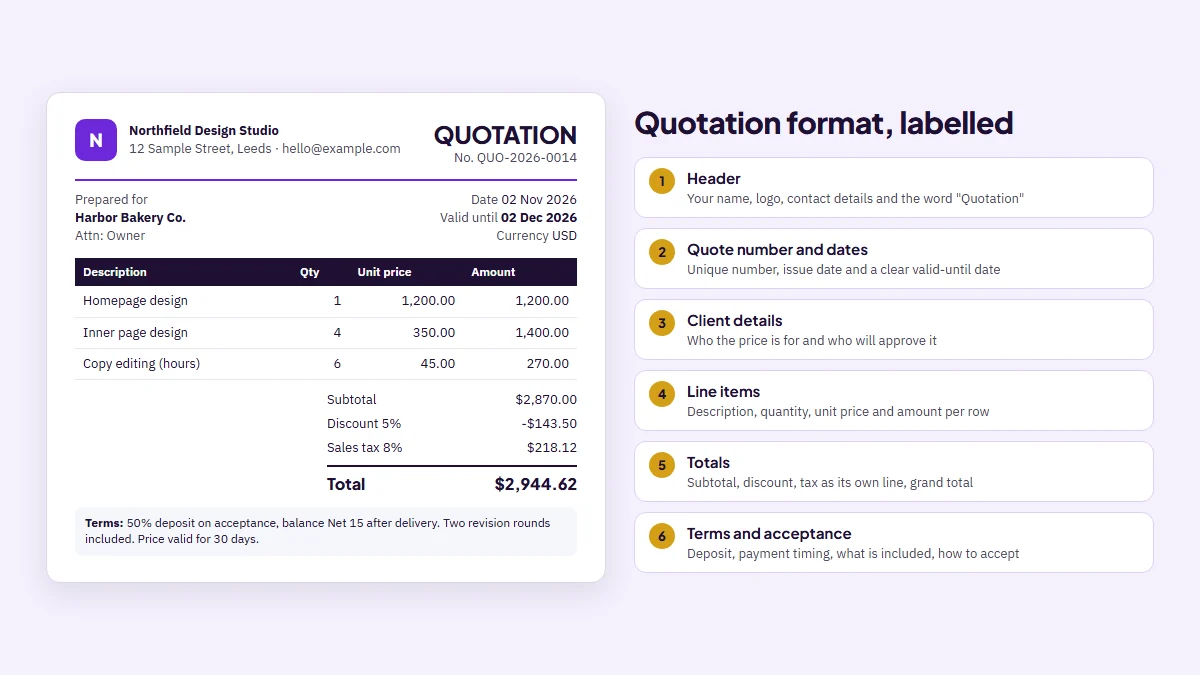
A quotation format is the standard layout of a price quote: your business details, the client's details, a quote number and date, a valid-until date, itemised lines with quantity and unit price, subtotal, discount, tax and a grand total, followed by terms and a way to accept. If those parts are on the page in that order, the client can read the price, compare it and say yes without a follow-up email.
This guide gives you a sample you can copy, a filled-in example with real totals, a simple and a detailed version, and notes for hotel, product, website, accounting and tender quotes. If you would rather fill in boxes than format a document, the free quote maker builds the same layout and downloads a PDF.
What a quotation format is (and what it is not)
A quotation is a price offer. The Cambridge Dictionary defines it as "the price that a person or company says they will charge to do a piece of work". The format is simply the agreed order in which you present that price, so every quote you send looks and reads the same way.
The word that matters most is offer. New Zealand's official consumer guidance puts it plainly: "A quote is an offer to do a job for a specified price", and once the client accepts, the provider cannot charge more unless extra work is agreed or the scope changes. In practice, a quote you send is a number you are expected to stand behind.
That is why a quotation format is not just decoration. A clear layout protects you as much as the client. It pins down what is included, for how long the price holds, and what happens when the job grows. A vague quote invites the classic dispute: "I thought that was included."
A quotation is also not an invoice. An invoice asks for payment for work that was agreed or delivered. A quotation comes before that and asks only for a decision. Keeping the two apart, with different titles and number series, saves confusion when a client's accounts team tries to pay a quote by mistake.
Short version: a good quotation format answers four questions on one page. What exactly is being sold, for how much, until when is the price valid, and how does the client say yes.
The parts of a professional quotation format
Most professional quotation formats share the same ten blocks. You can drop a few for a tiny job, but if you are unsure, keep them all. Missing information is what turns a one-email sale into a three-email thread.
- Header: your business name, logo, address, email and phone, plus the word "Quotation" or "Quote" so nobody mistakes it for a bill.
- Quote number: a unique reference such as QUO-2026-0014. It lets you and the client talk about the same version.
- Issue date: the day you send it.
- Valid-until date: the last day the price holds. Thirty days is common for services; use less if your material costs move quickly.
- Client details: company name, contact person and address. Add their reference or purchase request number if they gave you one.
- Line items: description, quantity, unit and unit price for each row, with the line amount calculated.
- Totals: subtotal, any discount, each tax as its own line with its rate, and the grand total in a named currency.
- Scope notes: what is included, and just as important, what is not.
- Terms: deposit, payment timing after the work, delivery or start date, and how changes are priced.
- Acceptance: a signature line, or one sentence such as "Reply to this email to accept".
Our opinion after building a quote tool: the valid-until date is the most skipped field and the most expensive one to skip. Without it, a client can reply four months later and expect last season's price.
Sample quotation format you can copy
Here is a blank quotation format in plain text (or download the ready-made free quote template). Paste it into a document or email, replace the brackets, and you have a simple quote form that covers the essentials.
| Block | What to write |
|---|---|
| Title | QUOTATION |
| From | [Your business name], [address], [email], [phone], [tax ID if you have one] |
| Quote no. | [QUO-YYYY-0001] |
| Date / Valid until | [issue date] / [issue date + 30 days] |
| Prepared for | [Client company], [contact name], [address] |
| Line items | [Description] | [Qty] | [Unit price] | [Amount] |
| Totals | Subtotal, Discount, [Tax name and rate], Total [currency] |
| Scope | Included: [...]. Not included: [...]. |
| Terms | [Deposit], [payment timing], [start or delivery date], [how extra work is priced] |
| Accept | [Signature and date] or "Reply to accept" |
Need a quotation sample format as a PDF instead? Fill the same fields in the online quote form and download it. It works in the browser without an account, which makes it a quick way to get a clean, editable quotation format online for free.
Worked example: a web design quote in Prima Invoice
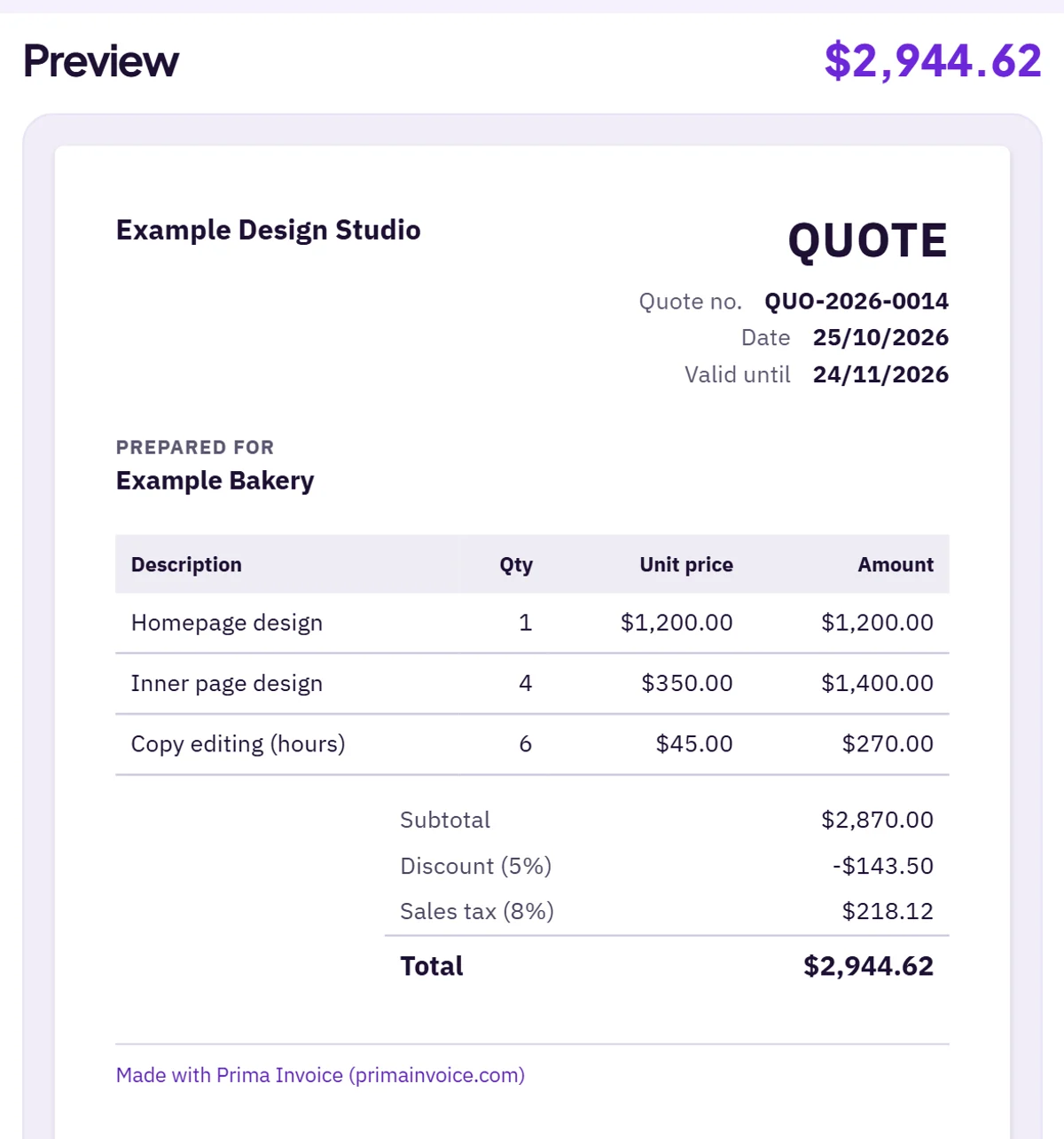
Let's fill in a real one. A small design studio is quoting a bakery for a new website, priced in US dollars, with a 5% discount for paying a deposit up front and an 8% sales tax the studio collects locally. These are illustrative numbers; your tax rate is whatever applies to you.
| Line | Qty | Unit price | Amount |
|---|---|---|---|
| Homepage design | 1 | $1,200.00 | $1,200.00 |
| Inner page design | 4 | $350.00 | $1,400.00 |
| Copy editing (hours) | 6 | $45.00 | $270.00 |
| Subtotal | $2,870.00 | ||
| Discount 5% | -$143.50 | ||
| Sales tax 8% (on $2,726.50) | $218.12 | ||
| Total | $2,944.62 | ||
We ran these lines through the same calculation code our quote maker uses. The order matters: each line is rounded to the cent first, the discount comes off the subtotal, and tax is charged on the discounted amount. Charge the tax on the full $2,870.00 and then take the discount off, and you would quote $2,956.10 instead: $11.48 of tax on money the client never pays, which looks small until their bookkeeper spots it.
In the quote maker you would add the logo, type the three lines, set the discount to 5% and add one tax named "Sales tax" at 8%. Set the valid-until date, write the terms, and download the PDF. When the bakery says yes, the quote converts into an invoice with the same lines and the same $2,944.62 total, and the number changes from QUO-2026-0014 to INV-2026-0014 so both sides can match the paperwork.
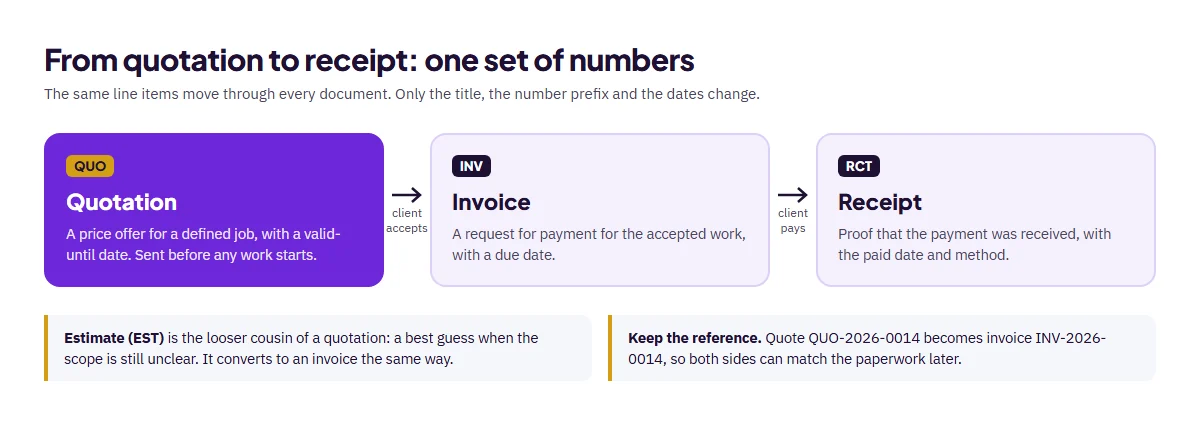
Once the invoice is paid, the receipt maker produces the proof of payment from the same data; our guide to a receipt of payment shows what it should say. Typing the numbers once, instead of three times, is where most of the errors in small-business paperwork disappear.
Simple vs detailed quotation format
There is no single best quotation format. There is the format that fits the size of the job. A five-line quote for printing business cards does not need a change policy. A twelve-week fit-out does.
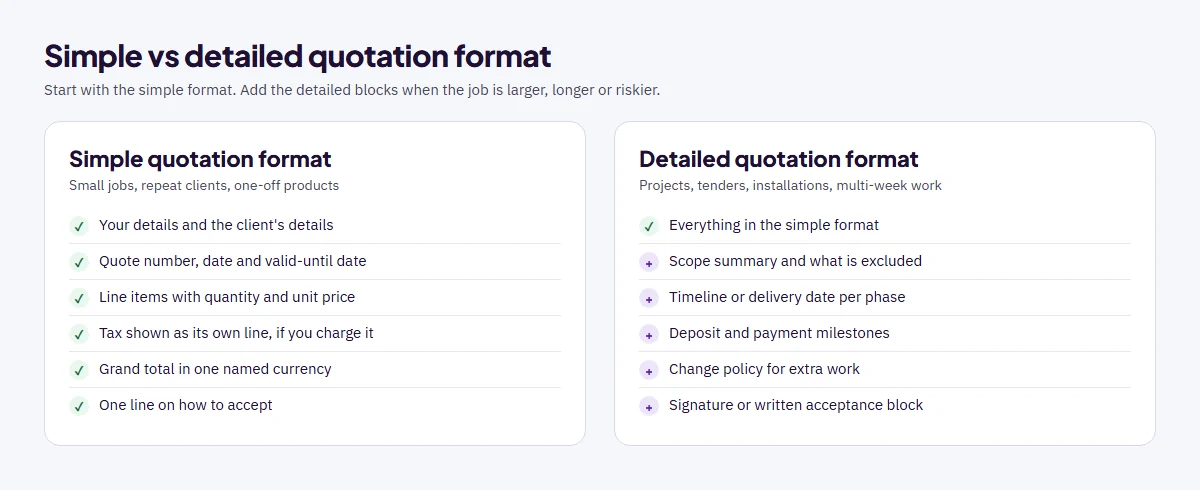
A simple quotation format is right for small jobs, repeat clients and product orders where the price is the whole story. A detailed format, sometimes called a proposal quotation format, adds a scope summary, exclusions, a timeline, payment milestones, a change policy and a signature block.
Here is a contrarian take: longer is not more professional. We have seen quotes lose to cheaper competitors simply because the client could not find the total on page three. Whatever format you choose, put the grand total and the valid-until date where a busy person sees them in five seconds.
Quotation format by industry
The core blocks stay the same everywhere. What changes is how you describe the lines and which terms matter most. These adjustments cover the most searched versions.
| Industry | How the lines look | Terms to add |
|---|---|---|
| Hotel and room bookings | Room type x nights, meals, meeting room, transfers | Check-in and check-out dates, cancellation deadline, guaranteed room count |
| Products, furniture, machines | Model or SKU, quantity, unit price, delivery charge | Delivery lead time, warranty, installation included or not |
| Materials, tiles, construction | Material per square metre or unit, labour hours, waste allowance | Short validity (prices move), site access, extra work rates |
| Website and software | Design, pages, features, hosting setup, monthly support | Revision rounds, content supplied by client, ownership after payment |
| Accounting and professional services | Fixed fee per service or hourly rate with estimated hours | Period covered, documents the client must provide, out-of-scope rate |
| Tenders and purchase requests | Follow the buyer's item list and units exactly | Buyer's reference number, validity they asked for, delivery terms |
For tenders and purchase quotations, the buyer's format wins. If a purchasing team sends a request with numbered items, mirror their numbering and units even if your own template differs. Quotes that are easy to compare line by line are the ones that get shortlisted.
If you charge GST, VAT or sales tax, show it as its own line with its name and rate rather than burying it in unit prices. Rules on what tax documents must show differ by country, so check your local tax authority for the invoice you send later. A quote that already separates tax makes that invoice a straight copy.
Several of these industries also have ready-made layouts in our invoice templates, and the same fields work for a quote.
Quotation vs estimate vs pro forma vs invoice
These four documents look alike, which is exactly why people mix them up. If you sell goods across borders, our pro forma invoice guide covers the third one in depth. The difference is in what each one commits you to.
| Document | What it does | Price commitment |
|---|---|---|
| Quotation | Offers a specified price for a defined job | Firm for the scope and validity period |
| Estimate | Gives a best guess when the scope is unclear | Approximate; can move up or down |
| Pro forma invoice | A quote laid out like an invoice, often for import paperwork or prepayment | As quoted; issued before the sale is final |
| Invoice | Requests payment for work agreed or delivered | The amount now owed |
New Zealand's consumer guidance sums up the first two: "Estimates give a rough idea of the cost. Quotes are generally a confirmed maximum price." It adds that a final price should generally land within 10 to 15% of an estimate. That figure is New Zealand guidance, not a global rule, but it is a useful sanity check anywhere. When the scope is still fuzzy, send an estimate from the estimate maker (or the free estimate template) instead of a quote you may regret.
The U.S. International Trade Administration describes a pro forma invoice as "a quote in an invoice format" that a buyer may need for an import license or a letter of credit. For the final bill, the UK government's list of what an invoice must include starts with "a unique identification number", which is one more reason to keep quote and invoice numbers in separate series.
Mistakes that make a quote cost you money
Most quoting problems are not about price. They are about gaps the client fills with their own assumptions.
- No expiry date. The price stays open forever, including after your costs go up.
- Lump sums without lines. "Website: $2,900" invites haggling. Itemised lines show where the money goes and make partial approval possible.
- Tax hidden inside prices. The client cannot tell if the total includes tax, and their accountant will ask.
- No exclusions. If stock photos, hosting or travel are not included, say so on the quote.
- Unclear deposit. State the amount and when it is due, and make it easy to pay with your own Stripe or PayPal payment link. On consumer jobs, keep it modest: New Zealand's guidance tells consumers not to pay a deposit of more than 10% of the total.
- Currency left implicit. "$" can mean several currencies. Write USD, AUD, CAD or the ISO code you mean.
The fix for all six is the same: use one consistent quotation format for every client, so nothing depends on remembering.
How to write and send a quotation
Here is the routine we suggest, from first call to accepted quote.
- Confirm the scope in writing: what the client wants, by when, and anything they will supply.
- Price each part as its own line, with quantity and unit price.
- Decide on discount and tax, and show each as a separate line.
- Set a valid-until date that matches how stable your costs are.
- Write the terms: deposit, payment timing after the work, change policy.
- Export a PDF, name the file with the quote number, and send it with a one-line summary of the total and expiry.
- Follow up a few days before the expiry date, not the day after.
When the client accepts, turn the quote into an invoice instead of retyping it. You can do that in the invoice generator, which keeps the same lines and totals. A clean quotation format at the start makes every document after it faster.
Frequently asked questions
What is the format of a quotation?
A quotation format lists your business details, the client's details, a quote number, issue date and valid-until date, itemised lines with quantity and unit price, subtotal, discount, tax and grand total, then scope notes, terms and a way to accept.
Is a quotation legally binding?
A quotation is an offer. Official New Zealand consumer guidance says that once a quote is accepted, the provider cannot charge more unless extra work is agreed or the scope changes. Contract rules differ by country, so check local law for disputes.
How long should a quotation be valid?
Thirty days is common for services. Use a shorter period, such as 7 to 14 days, when material or supplier prices change quickly, and always print the valid-until date on the quote.
What is the difference between a quotation and an estimate?
A quotation is a specified price for a defined job. An estimate is a best guess when the scope is unclear, and the final price can be higher or lower.
Can I turn a quotation into an invoice?
Yes. In Prima Invoice a quote converts into an invoice with the same lines, discount, tax and total; only the title, number prefix and dates change.
Should a quotation include tax?
If you will charge GST, VAT or sales tax, show it as a separate line with its name and rate so the client sees the full cost. What a tax invoice must show later depends on your country's rules.
Can I charge for preparing a quotation?
You can, but say so before you start. New Zealand's official consumer guidance notes that a business must tell the customer beforehand if it charges a fee to prepare a quote. Most small businesses quote for free and build the cost of quoting into their prices.
What if the client wants changes after accepting a quote?
Agree the change and its price in writing before doing the extra work. New Zealand's consumer guidance says that once a quote is accepted, the provider cannot charge more unless the customer agrees to extra work or the scope changes, which it calls a variation to the contract. A revised quote with a new version number keeps it clear.